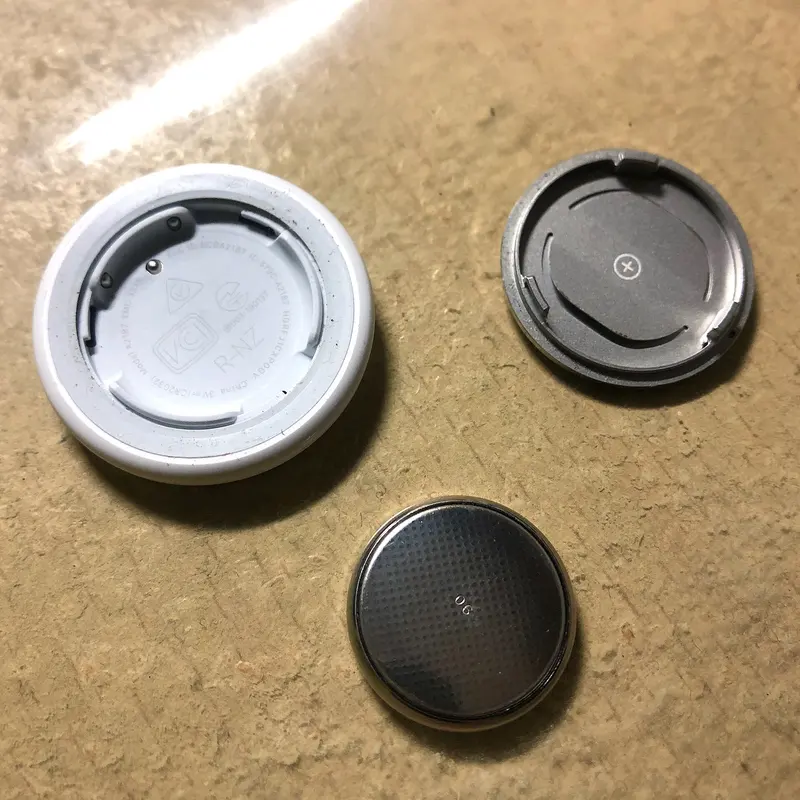
Phones now warn you when a tracker that isn’t yours seems to be travelling with you. Often there is an innocent reason — you have borrowed a friend’s bag, or a family member’s keys are in the car. But trackers can be misused: police.uk warns that if they are dropped into a bag or pocket, or hidden in a car, they can be used to stalk people.
What the alert looks like
On an iPhone or iPad (iOS/iPadOS 14.5 or later; alerts for other makers’ compatible trackers need 17.5 or later) you may see:
- “AirTag Found Moving With You”
- “[Product name] Found Moving With You” for Find My accessories and compatible trackers from other brands
- “AirPods Detected” or “Unknown Accessory Detected”
You need Location Services, Bluetooth and Tracking Notifications turned on (and Airplane Mode off) to receive them.
On Android (Android 6.0 or later) you get an unknown tracker alert for Find Hub tags, other compatible trackers and Apple AirTags. You can also scan at any time: Settings → Safety and emergency → Unknown tracker alerts → Scan now (it takes about 10 seconds).
Since May 2024 Apple and Google have used a shared standard, Detecting Unwanted Location Trackers, so these alerts work across iPhone and Android whichever platform the tracker belongs to.
Step by step
- Open the alert and look at the map. On iPhone, Find My shows red dots where the item was detected near you. On Android, tap the notification to see where it travelled with you.
- Play a sound to find it. Tap the alert, then Continue and Play Sound (iPhone) or Play sound (Android). On Android, the owner isn’t notified when you do this. If your iPhone has Ultra Wideband you can use Find Nearby to home in on an unknown AirTag; Android offers Find nearby for Find Hub trackers. If you can’t hear it, check jacket pockets, the outer pockets of bags, and your car.
- Check whether it’s innocent. Does it belong to someone you are with? On iPhone, if you’ve borrowed an item from someone in your Family Sharing group, you can turn off alerts for it.
- Get information about it. Hold the top of your iPhone, or any NFC-capable phone, to the white side of an AirTag. A web page shows its serial number and the last four digits of the owner’s phone number (and a contact message if the owner marked it as lost). On Android, hold an AirTag to the back of the phone, or follow the on-screen steps for Find Hub trackers. Take a screenshot. police.uk advises photographing a tracker where you found it, if it is safe to do so.
- Decide whether to disable it — safely. Your phone offers “Instructions to Disable” the tracker. Once it is disabled the owner stops getting location updates. But before you do:
- Refuge warns that removing location tracking can lead abusers to escalate, and can destroy evidence.
- Google notes that some trackers reset when turned off, and the police then can’t get owner information; the owner may still see the last location from before it was switched off.
- Turning off Bluetooth, Location Services or aeroplane mode on your phone does not stop the owner seeing the tracker’s location.
- If you feel unsafe, go to a safe public place and contact the police. Apple says the police can work with Apple to request information about an item — keep the tracker and its serial number.
Who to contact (UK)
| Who | When | Contact |
|---|---|---|
| Police | Emergency or immediate danger | 999 |
| Police | Non-emergency (England and Wales), or report online with your local force | 101 |
| National Stalking Helpline (Suzy Lamplugh Trust) | Advice if you think you are being stalked | 0808 802 0300 — Mon and Wed 09:30–20:00; Tue, Thu and Fri 09:30–16:00 |
| Refuge National Domestic Abuse Helpline | If tracking is part of domestic abuse | 0808 2000 247 |
police.uk says you don’t need to collect “evidence” before reporting stalking or harassment — but if you keep a record, note dates, times, any witnesses, and keep messages and screenshots.
Why trackers make a sound
To make hidden tracking harder, an AirTag (and compatible trackers) that has been separated from its owner for a period of time makes a sound when it is moved. Apple doesn’t give an exact time. If you hear an unexpected chirp from your bag or car, look for a tracker.
Is tracking someone illegal?
Apple says AirTags and Find My accessories should not be used to track people, and that tracking people without consent is a crime in many countries. Google’s rules forbid using Find Hub to find out where someone is without their knowledge and consent. In England and Wales, the Crown Prosecution Service lists monitoring a person’s use of electronic communications, following, and watching or spying among examples of stalking behaviour under the Protection from Harassment Act 1997. See privacy and anti-stalking protections.
This guide is general information, not legal advice. If you are worried about your safety, contact the police or one of the helplines above.
Sources
- police.uk — protection from online stalking and harassment (AirTags and other Bluetooth trackers)
- police.uk — what to do if you’re being stalked or harassed
- Apple Support — what to do if you get an alert that an AirTag or other item is with you
- Apple Personal Safety User Guide — detect unwanted trackers
- Android Help — unknown tracker alerts
- Apple Newsroom (UK), May 2024 — Apple and Google unwanted tracking alerts
- Suzy Lamplugh Trust — National Stalking Helpline
- Suzy Lamplugh Trust — reporting stalking
- Refuge Tech Safety — location tracking guide
- Refuge Tech Safety — AirTags
- Google — Find Hub acceptable use policy
- Crown Prosecution Service — stalking or harassment guidance
This guide is general information, not legal or safety advice for your situation. If you are in danger, call 999.