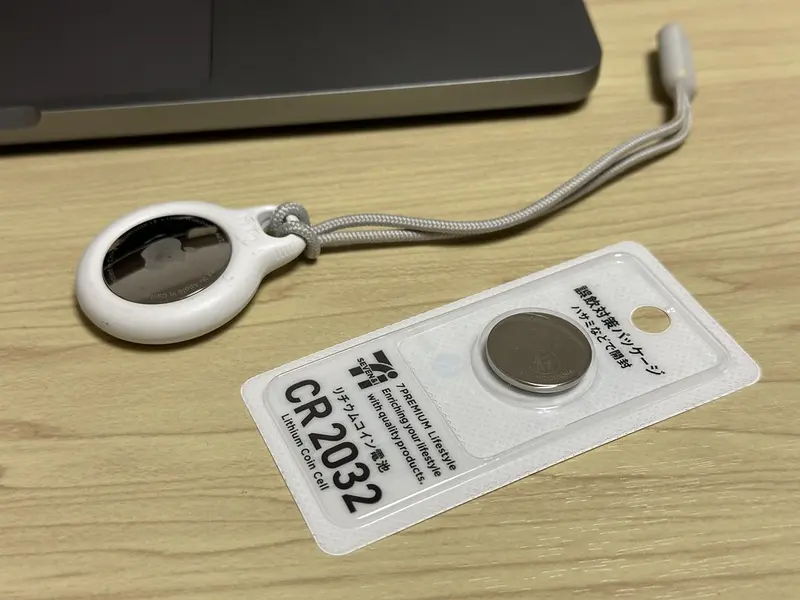
Most replaceable trackers use a CR2032, a 3-volt lithium coin cell. Your phone will usually tell you when the battery is low — for an AirTag, Find My shows “Low Battery” under its name, and Google’s Find Hub shows tag batteries as “OK”, “Low” or “Very low” (Google suggests replacing or charging at “Low”).
AirTag (both generations)
Apple’s steps:
- Press down on the polished stainless steel battery cover and turn it anticlockwise until it stops.
- Remove the cover and the old battery.
- Fit a new CR2032 lithium 3V coin cell with the positive (+) side facing up. You’ll hear a sound when it connects.
- Line up the three tabs on the cover with the three slots on the AirTag, then turn the cover clockwise until it stops.
Apple suggests a CR2032 with a bitter coating to discourage swallowing, but warns that some bitterant-coated batteries might not work with AirTag — look for packaging that says it is compatible with AirTag.
Galaxy SmartTag2
The SmartTag2 uses a replaceable CR2032 in a small tray, and Samsung includes a tray eject pin in the box. Samsung’s instructions (from its Singapore support site; we couldn’t find a UK equivalent) say to put the supplied pin, or a clip, into the battery-tray hole and gently pull the tray out. Samsung rates the battery at up to 500 days, or longer in Power Saving Mode.
Tile
- Tile Pro is the only current Tile with a battery you can change. It takes a CR2032 — open the battery compartment, swap the cell (check it faces the right way), then reconnect the Tile in the app. Tile advises against mixing old and new batteries.
- Tile, Tile Slim and Tile Sticker have sealed batteries rated for up to three years. When they run out, you replace the tracker.
Other trackers
| Battery | Examples |
|---|---|
| Replaceable CR2032 | AirTag, Galaxy SmartTag2, moto tag and moto tag 2, Tile Pro, Chipolo POP, eufy SmartTrack Link, Xiaomi Tag, UGREEN FineTrack |
| Rechargeable | Chipolo LOOP and CARD, Pebblebee Clip 5 and Card 5, eufy Card E30 and E40, Knog Scout |
| Sealed (replace the tracker) | Tile, Tile Slim, Tile Sticker, eufy SmartTrack Card |
Use the battery filter to see them all.
Button and coin battery safety
The government’s Office for Product Safety and Standards (OPSS), the Child Accident Prevention Trust (CAPT), RoSPA and the NHS all warn about button batteries:
- A swallowed button battery can react with saliva to create caustic soda, which can burn through the throat and cause internal bleeding or death. Large lithium coin cells — CAPT names the CR2032 among them — are the most dangerous, and CAPT says the damage can start in as little as two hours. Children aged 1 to 4 are most at risk.
- “Flat” batteries are still dangerous. Dispose of used ones straight away (take them to a battery recycling point).
- Store spare batteries securely, up high and out of reach.
- Apple says an AirTag, its battery cover and battery may be a choking hazard for small children. Samsung advises keeping tags and their batteries away from children and pets, and warns that a tag on a pet collar could come off and be swallowed.
- If a child swallows one: go straight to A&E or call 999, take the packaging, and don’t wait for symptoms.
Sources
- Apple Support — replace the battery in AirTag
- Android Help — share and manage a tracker tag (battery levels)
- Samsung UK — Galaxy SmartTag2 (battery and box contents)
- Samsung Singapore Support — troubleshooting Galaxy SmartTag2 (battery tray)
- Life360 Support — replace a Tile battery
- Tile blog (archived copy) — replace a Tile Pro battery
- Life360 Support — Tile models and specifications
- GOV.UK (OPSS) — button batteries: how to stay safe
- CAPT — button batteries: understanding the risks
- CAPT — button batteries in an emergency
- RoSPA — button batteries
- NHS — what to do if your child has an accident
- Samsung Global Newsroom — Galaxy SmartTag3 (battery safety notes)
This guide is general information, not legal or safety advice for your situation. If you are in danger, call 999.